When I got my Nexus S last month, I was excited about a number of things, but particularly the remarkable battery life promised by a number of reviewers. If I had one complaint about the Nexus 1, it was that the battery often gave up the ghost by the end of the day. I got used to charging during the middle of the day just to be safe, and for the most part that worked, though it didn’t avoid the fairly often end-of-day battery drain (which always seemed faster than at any other point in the day).
When I started seeing similar behavior with the Nexus S, I was concerned. Thanks to a couple Android utilities, however, I was able to finally figure out what the root issue was. And with the help of Tasker, a terrific Android app, I believe I’ve completely solved the problem – not to mention gained a very useful utility that’s capable of doing a lot more.

It turns out that the issue is where I live: there’s next to no T-Mobile service within about 100 yards of my house. Elsewhere in the neighborhood is fine – but the particular hill we live on is a dead spot. In Settings, I clicked on “About phone” and then “Battery Use” to get a full report of what processes were responsible for the battery usage. It’s a handy way to know what’s responsible (if anything) for abnormal battery consumption – in my case, it was “Cell standby”. What this means is that the phone was trying to acquire a (mostly) nonexistent cell signal – the longer it tried, the faster the battery drained.
I experimented with using the phone’s airplane mode (turning off all radio antennae) to see if it helped – and sure enough, the phone held its charge without a problem. Now that I’d isolated the culprit, I wanted to automate the process of disabling the radio antenna so that the phone wasn’t constantly trying to reaquire a cell signal – that’s where Tasker comes in.
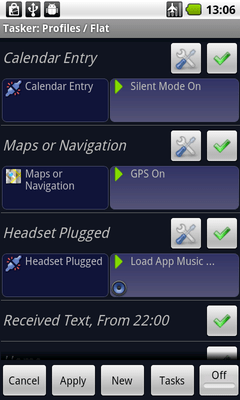
Tasker’s an automation app for Android. You can define a set of criteria that, when met, trigger an action – loading an app, presenting a menu, changing a system setting, etc. For this particular scenario, I just wanted to have the phone turn on airplane mode (but keep wifi and bluetooth on) whenever I’m home. Tasker made this a trivial task – and the battery at the end of the day is now often north of 40% where it was previously empty by day’s end.
There’s a lot that Tasker can do for you – check out the example profiles included in the Tasker wiki. Each profile is described in detail, and includes a download link so you can load the profile directly into Tasker. For around $6, it’s a great deal. (You can download a 7 day trial here, if you want to kick the tires before buying.)
If you’re looking for other things you can do with Tasker, Lifehacker has a great write-up with step-by-step instructions about how you can use Tasker to extend your Android phone’s capabilities. I particularly like the profile that asks you which music app to load when you plug the headphones in:

I asked some co-workers for tips on how they use it, and one guy had a great idea: when the phone is placed face down (like in a meeting), have Tasker mute the audio and turn off wifi, bluetooth, GPS, etc. Ultimately, it’s this kind of customization and control over your phone that I love about Android. One warning, however: Tasker, while powerful, is itself rather utilitarian in design. It will take a bit of getting used to, and you’ll need to invest some time in learning its quirks from an interface perspective. (Critics will rightly point out that this is the trade you make when you give users customization and control over the phone. I’m quite comfortable with that trade-off, but your mileage may vary.)
So how about you: any Android automation tips? Do you have a Tasker profile you want to share? Feel free to leave them in the comments.

Leave a Reply